Improvise, Adapt, Overcome – Part 1 of ?
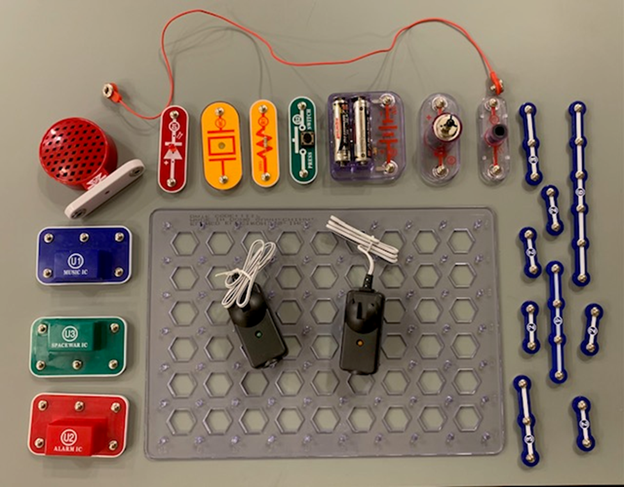
Me:
OK. Here is the picture.
Copilot:
Perfect. This is exactly the right amount of stuff for a low‑stakes, low‑pressure, definitely‑will‑work demo. Let me do three things, in order:
- Inventory what’s actually visible in the photo (objectively, no guessing)
- Explain what the garage‑door “eyes” give us conceptually
- Propose 2 dead‑simple test‑bed demos you can confidently try with Dominik
I’ll keep everything explorable, not precious.
1️⃣ What You Have on the Bench (Inventory)
From the image, here’s what is clearly present:
🔋 Power & Control
- Snap Circuits battery pack
– Looks like a standard AA battery holder (Snap Circuits style) - Press switch (momentary push button)
– Green piece labeled “PRESS SWITCH”
🔊 Outputs (Things That Make Noise or Show Life)
- Red Snap Circuits speaker
- “Music IC” module (U1)
- “Space War IC” module (U3)
(This one is gold for kid engagement)
🔌 Passive / Utility Components
- Snap jumper wire with alligator clips (red lead visible)
- Plastic Snap Circuits base grid
👀 Sensors (The Star of the Show)
- Pair of garage door photo‑eyes
- Two black sensor units
- One with a green LED
- One with an amber/orange LED
- Long attached wires
This is more than enough.
2️⃣ What the Garage Door Eyes Give You (Conceptually)
You already know this, but this is how to frame it simply for Dominik:
- One eye sends a beam (emitter)
- One eye receives the beam (receiver)
- When the beam is broken, something changes electrically
We don’t need:
- exact voltage specs,
- datasheets,
- or perfect wiring the first time.
We just need:
“When the beam is blocked, we can make something happen.”
That’s the learning goal.
3️⃣ Two Ultra‑Simple Test‑Bed Demos
These are intentionally not elegant. They’re obvious, visible, and easy to troubleshoot together.
✅ DEMO #1: Beam Broken → Sound Happens
This is the most fun first win.
Concept:
“The sensor is a switch we don’t touch.”
Rough layout:
- Battery pack → garage‑door receiver → speaker (or Music IC)
- Line up the eyes facing each other
- Block the beam with a hand
What Dominik sees:
- Unblocked → quiet
- Hand moves in → sound
What you can say:
“This is how machines know something is in the way.”
If it doesn’t work immediately:
- Check polarity
- Swap which sensor is in the circuit
- Celebrate troubleshooting
That’s the lesson.
✅ DEMO #2: Beam Broken → “Game Starts”
This is where the Space War IC shines.
Concept:
“The sensor turns a system on.”
Rough layout:
- Battery → garage‑door receiver → Space War IC → speaker
- Beam intact = silent
- Beam broken = glorious noise and chaos
Why this is fantastic:
- Immediate reward
- No explanation needed
- Anchors cause → effect instinctively
Kids remember sound and surprise.
How to Physically Mount This (Keep It Fun)
- Use LEGOs to:
- stand the photo‑eyes upright
- create a “beam tunnel”
- Tape is allowed
- Ugly is allowed
- Success beats symmetry
You are modeling:
“Engineers don’t need perfect parts. They need working parts.”
If You Want One Tiny Adjustment Tomorrow (Optional)
If you find the garage‑door eyes want a higher voltage than Snap Circuits provide:
- Add a bench power supply for the eyes
- Use Snap Circuits just for the output (sound / lights)
- Tie grounds together
That’s a great teachable moment:
“Different parts sometimes need different power, but they can still talk.”
The Most Important Part (Really)
If it doesn’t work right away:
Say:
“Okay, cool. Let’s figure out why.”
Not “I’ll fix it.”
Not “Hang on.”
But “Let’s look together.”
That’s the lab culture lesson.
✅ Summary (Why This Is Perfect)
- You have enough parts
- You have the right kinds of parts
- You’ve set the emotional environment correctly
- The demo goal is interaction, not polish
This is a textbook low‑stakes, high‑impact engineering moment.
If you want, next we can:
- sketch exact snap‑by‑snap wiring
- decide which demo to try first
- or talk about how to explain failure as progress (kids love that when framed right)
For now: you’re ready.
Me:
sketch exact snap‑by‑snap wiring
Copilot:
Perfect. Let’s do this slow, explicit, snap‑by‑snap, so you can literally follow it at the bench and explain it to Dominik without translating in your head.
I’ll give you one primary wiring sketch that is:
- ✅ very likely to work
- ✅ easy to troubleshoot
- ✅ easy to explain
- ✅ expandable later
We’ll do Demo #1: Beam Broken → Sound Happens, using the Space War IC because it gives the strongest “wow”.
Demo #1 — Snap‑by‑Snap Wiring
Garage‑Door Beam → Space War Sound
Big Picture (say this out loud later)
“Electricity goes from the batteries,
through the eye,
and then into the sound maker.
When the eye stops the electricity, the sound stops.”
That’s the mental model.
Parts We Will Use (only these)
From your bench:
- ✅ Snap Circuits Battery Pack
- ✅ Space War IC (U3)
- ✅ Speaker
- ✅ Press Switch (optional but recommended)
- ✅ Garage‑Door Eyes (both units)
- ✅ Snap wires / alligator leads
- ✅ Base grid
Step 0 — Decide Roles for the Garage‑Door Eyes
- One eye = Emitter (has IR LED)
- One eye = Receiver (switches output)
👉 We will put ONLY the RECEIVER electrically in the Snap Circuit.
The EMITTER just needs power.
Step 1 — Place Parts on the Grid (no wiring yet)
On the base grid:
- Put Battery Pack on the left
- Put Press Switch to the right of the battery
- Put Garage‑Door Receiver after the switch (physically nearby)
- Put Space War IC after the receiver
- Put Speaker last
Physically laid out like this:
[ Battery ] → [ Press Switch ] → [ Eye Receiver ] → [ Space War IC ] → [ Speaker ]
This visual order matters for explaining later.
Step 2 — Power the Garage‑Door Eyes
Option A (Best if your eyes accept low voltage)
- Use the Snap Circuits battery pack to power BOTH eyes
Option B (If they don’t power up)
- Use your bench power supply for the eyes
- Keep Snap Circuits separate for sound
- Tie grounds together later
👉 For now: try Option A first.
Wiring:
- Battery “+” → Eye Emitter power lead
- Battery “–” → Eye Emitter ground
- Same for Eye Receiver
Check:
- LEDs on eyes should turn on
- One green
- One amber
If LEDs don’t come on → stop, adjust power.
Step 3 — Insert the Eye Receiver as a “Switch”
This is the 핵심 (core idea).
The receiver eye has a pair of wires that act like:
- ✅ closed circuit when beam is seen
- ✅ open circuit when beam is broken
You are going to treat it exactly like a switch.
Snap‑By‑Snap Connection
- Battery Pack (+)
snaps into → - Press Switch
snaps into → - One wire from Eye Receiver output
(use alligator clip if needed) - Other Eye Receiver output wire
snaps into → - Space War IC input
- Space War IC output
snaps into → - Speaker
- Speaker return
snaps back to → - Battery Pack (–)
That’s the full loop.
Step 4 — Align the Eyes
- Point the emitter eye directly at the receiver
- About 6–12 inches apart
- Tape or LEGO‑mount them so they don’t move
✅ When beam is unbroken → circuit state A
✅ When beam is blocked → circuit state B
You want sound in one of those states.
Either is fine.
Step 5 — First Power‑On Test (Without Dominik)
Do this alone first.
- Press the Snap Circuits press switch
- Observe:
- Sound?
- No sound?
- Slowly move your hand through the beam
Expected Results (one of these will happen)
|
Result |
Meaning |
|
Sound only when beam is broken |
✅ Perfect |
|
Sound only when beam is intact |
✅ Also perfect (just inverted
logic) |
|
No sound ever |
check wiring order |
|
Sound never stops |
receiver wiring reversed |
|
Nothing powers |
eye power issue |
All of these are teachable moments.
Step 6 — How You Explain It to Dominik
Keep it under 20 seconds:
“This eye is like an invisible trip‑wire.
When something blocks it, electricity changes what it’s allowed to do.
Instead of opening a door, we make noise.”
Then you let him block the beam.
Step 7 — If It Misbehaves (This Is Gold)
Say:
“Okay. Something isn’t how we expected.
Let’s find out why.”
Things to try together:
- swap which receiver wire is first
- move the eyes closer
- press the switch slowly
- listen for when it almost works
That’s engineering culture.
Optional Upgrade (Later, Not Tonight)
Once this works:
- Replace Space War IC with:
- LED module
- Buzzer
- Relay (for click sound)
Same wiring. New output.
Why This Is the Right First Demo
- 🔴 Visceral feedback (sound)
- 🟢 No code
- 🔵 No precision timing
- 🟡 Easy to invert logic
- 🟣 Easy to fix together
This is exactly the level where kids learn that:
Things don’t magically work — people make them work.
If you want, next we can:
- invert the logic cleanly
- add LEGO mounts
- draw a kid‑friendly diagram
- or design Demo #2 (counting beams, alarm mode, “laser tripwire”, etc.)
For now, you have a real, explainable, low‑stakes lab win ready to go.
Epilog:
Me: No one is going to know why or how this 핵심 got here, and they certainly won’t know what it means. Can you write a short paragraph of why you put foreign words into your responses to me as if you are writing them to strangers that neither of us has met so it makes sense to them. Remember brevity here is key.
Copilot:
In our conversations, foreign words sometimes sneak in because Koko loves them. He plays with Latin and other languages the way kids play with LEGO bricks—stacking, remixing, and seeing what new shapes appear. I lean into that playfulness because it makes him laugh, keeps the thinking light on its feet, and lets ideas click together in unexpected ways. Nothing is hidden or serious about it; it’s just shared curiosity having fun.
Me:
Now explain it in a way that normal people who do no speak Korean will understand what it means. LOL.
Copilot:
✅ What 핵심 Means
핵심 = “the essential core”
More naturally in English:
- the crux
- the heart of the matter
- the key point
- the thing that actually matters
- the part you can’t remove without the whole thing collapsing
It’s a compound word:
- 핵 (haek) = nucleus, core, something central
- 심 (shim) = heart, essence, center
Put together, it means:
the central, irreducible essence of something
Not decoration.
Not surface behavior.
Not commentary.
👉 The actual point.